-->
Showing posts with label IT. Show all posts

16 March 2012

List Recent Post Titles By Label - Blogger Widget


List all or your most recent posts according to categories/labels

Copy the code below and paste it inside the content box

<!-- Recent Posts by Label Start -->
<!-- code by BloggerSentral.com -->
<script type="text/javascript">
function recentpostslist(json) {
document.write('<ul>');
for (var i = 0; i < json.feed.entry.length; i++)
{
for (var j = 0; j < json.feed.entry[i].link.length; j++) {
if (json.feed.entry[i].link[j].rel == 'alternate') {
break;
}
}
var entryUrl = "'" + json.feed.entry[i].link[j].href + "'";//bs
var entryTitle = json.feed.entry[i].title.$t;
var item = "<li>" + "<a href="+ entryUrl + '" target="_blank">' + entryTitle + "</a> </li>";
document.write(item);
}
document.write('</ul>');
}
</script>
<script src="http://satcore.blogspot.com/feeds/posts/summary/-/TV?max-results=500&alt=json-in-script&callback=recentpostslist"></script>
<span style="font-size: 80%; float:right;">Get this <a href="http://www.bloggersentral.com/2010/04/list-recent-posts-by-label.html">widget</a></span>
<!-- Recent Posts by Label End -->


  • Replace  http://satcore.blogspot.com  in code with your own blog URL.
  • Replace  TV  with the label. Labels are case sensitive, make sure you get it right.
  • Replace the value of  500 with the number of posts you want to display. To show all posts, use 500.
  • The titles are bulleted due the use of ordered list
  • If you want them numbered instead, just replace ul with ol.
  • Save, and see the result..

31 January 2012

Coding Untuk Hasilkan Kotak Menu atau "Dropdown / Select Box Navigation" dengan menggunakan JavaScript.


Navigasi Ringkas/ Simple Navigation

Berikut adalah "standard navigation" dengan


HTML Source:
<form action="../">
<select onchange="window.open(this.options[this.selectedIndex].value,'_top')">
    <option value="">Choose a destination...</option>
    <option value="http://www.yahoo.com/">YAHOO</option>
    <option value="http://www.google.com/">GOOGLE</option>
    <option value="http://www.altavista.com/">ALTAVISTA</option>
    <option value="http://www.amazon.com/">AMAZON</option>
    <option value="http://artlung.com/">ARTLUNG</option>
</select>
</form>


Dengan "Radio Buttons".

Konsepnya hampir sama dengan yang di atas, bezanya ia menggunakan "Radio buttons dan "activation button.

Choose a destination:


HTML Source:
<form action="../">
<p><b>Choose a destination:</b><br>
<input type="RADIO" value="http://www.yahoo.com/" name="userChoice" id="navRadio01">
<label for="navRadio01">YAHOO</label><br>
<input type="RADIO" value="http://www.google.com/" name="userChoice" id="navRadio02">
<label for="navRadio02">GOOGLE</label><br>
<input type="RADIO" value="http://www.altavista.com/" name="userChoice" id="navRadio03">
<label for="navRadio03">ALTAVISTA</label><br>
<input type="RADIO" value="http://www.amazon.com/" name="userChoice" id="navRadio04">
<label for="navRadio04">AMAZON</label><br>
<input type="RADIO" value="http://artlung.com/" name="userChoice" id="navRadio05">
<label for="navRadio05">ARTLUNG</label><br>
<--the onclick value below must all be on one line-->
<input type="BUTTON"
value="Go there!"
onclick="ob=this.form.userChoice;for(i=0;i<ob.length;i ){
if(ob[i].checked){window.open(ob[i].value,'_top');};}"></p>
</form>


Menu "Dropdown Navigation", Buka Dalam "New Tab"

HTML Source:
<form action="../">
<select name="myDestination">
<option value="http://www.yahoo.com/">YAHOO</option>
<option value="http://www.google.com/">GOOGLE</option>
<option value="http://www.altavista.com/">ALTAVISTA</option>
<option value="http://www.amazon.com/">AMAZON</option>
<option value="http://artlung.com/">ARTLUNG</option>
</select>
<input type="button"
value="Open in New Window!"
onclick="ob=this.form.myDestination;window.open(ob.options[ob.selectedIndex].value)">
</form>


Menu "Dropdown Navigation" Kepada Alamat E-mail

Choose a recipient address:

HTML Source:
<!-- initial version for email dropdown (c) 1999 Joe Crawford (joe(at)artlung.com) -->
<!-- coding tested and improved by Hayden Porter (hporter(at)uakron.edu) -->
<p><b>Choose a recipient address:</b></p>
<form action="../">
<select name="sendEmailTo">
<option value="mailto:joe@artlung.com">joe@artlung.com</option>
<option value="mailto:ArtLung@AOL.COM">ArtLung@AOL.COM</option>
<option value="mailto:webmaster@URMCargo.com">webmaster@URMCargo.com</option>
</select>
<input
type="button"
value="I've selected the recipient, Let's send mail!"
onclick="location.href=this.form.sendEmailTo.options[sendEmailTo.selectedIndex].value">
</form>
<!-- initial version for email dropdown (c) 1999 Joe Crawford (joe(at)artlung.com) -->
<!-- coding tested and improved by Hayden Porter (hporter(at)uakron.edu) -->


Menu "Dropdown Navigation" Kepada "New Window" Di Mana Saiz "New Window" Boleh Di Ubah


HTML Source:
<form action="../">
<--the onchange value below must all be on one line-->
<select name="myDestination"
onchange="this.form.WINDOW_NAMER.value++;
ob=this.form.myDestination;
window.open(ob.options[ob.selectedIndex].value
,'Window_Name'+this.form.WINDOW_NAMER.value,
'toolbar=1,location=1,directories=1,status=1,menubar=1,scrollbars=1,resizable=1,width=400,height=300')">
<option>Choose a destination to open in a attribute-controlled popup window!</option>
<option value="http://www.yahoo.com/">YAHOO</option>
<option value="http://www.google.com/">GOOGLE</option>
<option value="http://www.altavista.com/">ALTAVISTA</option>
<option value="http://www.amazon.com/">AMAZON</option>
<option value="http://artlung.com/">ARTLUNG</option>
</select>
<!-- HIDDEN VARIABLE SO WE PROVIDE UNIQUE NAMES FOR THESE NEW WINDOWS -->
<!-- THUS AVOIDING THE "WHERE'S THAT WINDOW" PHENOMENON -->
<input name="WINDOW_NAMER" type="HIDDEN" value="1">
</form>


Menu "Dropdown Navigation" Kepada "iFrame"

Sila ke http://www.w3.org/TR/REC-html40/present/frames.html#h-16.5 untuk fahami lebih lanjut tentang IFRAME.


HTML Source:
<select name="dest" onchange="window.open(this.options[this.selectedIndex].value,'myIFrame')">
<option>Choose a destination for your IFrame!</option>
<option value="http://www.yahoo.com/">YAHOO</option>
<option value="http://www.google.com/">GOOGLE</option>
<option value="http://www.altavista.com/">ALTAVISTA</option>
<option value="http://www.amazon.com/">AMAZON</option>
<option value="http://artlung.com/">ARTLUNG</option>
</select>
</form>

<iframe src="http://joecrawford.com/" name="myIFrame" width="400" height="200">
You can't see this because your browser does not support iframes.
</iframe>


Menu "Dropdown Navigation", Di Mana Terdapat Link Yang Boleh Di Buka Dengan "New Window" Serta Link Yang Boleh Di Buka Dengan "Current Window"
HTML Source:
<form action="../">
<select onchange="parseNavigation(this)">
<!-- in each option, the value should -->
<!-- include a pipe "|" character before each url, -->
<!-- to open in a new window, specify a window name -->
<!-- urls may be local -->
<option>Choose a destination to open in a attribute-controlled popup window!</option>
<option value="|http://www.yahoo.com/">YAHOO</option>
<option value="GoogleWin|http://www.google.com/">GOOGLE</option>
<option value="WSDWin|http://websandiego.org/">WEBSANDIEGO</option>
<option value="|http://www.altavista.com/">ALTAVISTA</option>
<option value="|http://www.amazon.com/">AMAZON</option>
<option value="ArtLungWin|http://artlung.com/">ARTLUNG</option>
</select>
</form>

Source Code:
<script type="text/javascript" language="JavaScript">
<!--
function parseNavigation(ob) {
// created by joe crawford october 2002
// http://artlung.com/lab/scripting/dropdown-only-some-new-window/
toBeBrokenDown = ob.options[ob.selectedIndex].value.split("|");

targetWindow = toBeBrokenDown[0];
targetURL = toBeBrokenDown[1];

if (targetWindow!=='') {
// if a new Window name is specified, then it will
// open in a new Window.
window.open(targetURL,targetWindow,'toolbar=1,location=1,directories=1,status=1,menubar=1,scrollbars=1,resizable=1,width=400,height=300');
// if we open a new window, then we have to re-set
// the select box to the first option
// which should have no value
ob.selectedIndex = 0;
} else {
// or else it will open in the current window
window.open(targetURL,'_top')
}
}
//-->
</script>


Menu "Dropdown Navigation" Dengan Butang "GO"

HTML Source:
<form action="../">
<select name="mySelectbox">
<option value="">Choose a destination...</option>
<option value="http://www.yahoo.com/">YAHOO</option>
<option value="http://www.google.com/">GOOGLE</option>
<option value="http://www.altavista.com/">ALTAVISTA</option>
<option value="http://www.amazon.com/">AMAZON</option>
<option value="http://artlung.com/">ARTLUNG</option>
</select>
<input type="button" onclick="window.open(this.form.mySelectbox.options[this.form.mySelectbox.selectedIndex].value,'_top')" value="Go">
</form>


Menu/ "Dropdown Navigation" Dengan Butang Gambar "GO"
HTML Source:
<form action="/" name="goForm">
<select name="mySelectbox">
<option value="">Choose a destination...</option>
<option value="http://www.yahoo.com/">YAHOO</option>
<option value="http://www.google.com/">GOOGLE</option>
<option value="http://www.altavista.com/">ALTAVISTA</option>
<option value="http://www.amazon.com/">AMAZON</option>
<option value="http://artlung.com/">ARTLUNG</option>
</select>
<a href="#Go" onclick="document.location.href=document.goForm.mySelectbox.options[document.goForm.mySelectbox.selectedIndex].value;"><img src="http://artlung.com/images/go.gif" value="Go" border="0" /></a>
</form>

*sumber diperolehi dari http://artlung.com/blog/

28 January 2012

Create a gif animation from uploaded pictures


11 January 2012

Panjangkan Trial Microsoft office kepada 180 hari


Windows: Jika anda ingin memaksimakan semua kegunaan Office 2010 sebelum anda dikehendaki untuk memiliki lesen, utiliti percuma Percubaan Extender akan melanjutkan tempoh percubaan percuma sehingga 6 bulan, tidak memerlukan command-line .

Seperti produk Microsoft berlesen yang lain, Office 2010 mempunyai fungsi 'rearm' tercipta di dalamnya untuk melanjutkan tempoh percubaan 30 hari tambahan. Sila klik link di bawah untuk memuat turun 'Office 2010 Trial Extender'


SATCORE ONLINE TV

09 January 2012

HTML Generator

06 January 2012

IT Tutorial


28 December 2011

SEO Tips for Blogger

Here is a collection of My SEO tips for my beloved readers.. 

1) Don't put too much posts on homepage - When you put too much content on homepage, it leads to duplicate content. Means many pages on your blog will have similar content. Your latest post page and your homepage has got the same content rite? 

2) Submit a Sitemap to Google Webmaster Tools 

3) You will have links to feeds on your pages. Or may be some links to social bookmarking sites. Too many links on a page makes it unfriendly for search engines. So you should add the rel='nofollow' tag to such not so important links.. 

- Feed links (The blog feed has same content as your blog.So it is important that you make the feed links nofollow) 
- Social Bokkmarking links - If you use social bookmark buttons like that for digg,stumble twitter etc, try making them nofollow.. 
- Links to unimportant pages(unimportant to search engines.. ;) )like contact me page,link to me page,about me page etc.. 
link name is a dofollow url 
link name is the nofollow version of the same link 

4) Use the Title Tag Hack 

5) Use Meta Tags 
- What you shouldn't do when using meta tags - I have seen many blogs using the same meta tag for all pages of the blog.You should never use such duplicate meta tags, I suggest that you use a separate meta description and keywords for your home page.You can use b:if conditions to do this. 

6) Get back links.. Get more links to your site from your friends.. ;)  You can also add aLink to your site Widget . 

7) Submit your blog to Directories. - One of them is here Blogger Directory 

8)I won't add a archive widget.If i do it i will display it on a particular page only. - Why? The archive widget has so many links in it..As i said too many links on a page is unfriendly to search engines. 

9)Don't add additional ROBOT meta tags.. Some guys try adding tags like  
Blogger automatically does some SEO for it.. Don't override it. You know something? Every blogger blog has got a robots.txt file.. see mine.. http://www.bloggerplugins.org/robots.txt Off course we cant edit them. 

10)When building back links use your primary keyword as the anchor text. Anchor Text - > Just to explain what an Anchor Text is. 
I use Blogger Widgets as my Anchor Text. 

11) Use Alt tags for images. When you use images try to add alt tags. For example can be replaced as Some alternate description for the image 

12) Focus on what you write. Always try to write some unique and interesting content.You cant hope to be on top of search engines with copy paste blog posts.. 

These are some of the ones that i remember..Will update it if i find anymore..

17 December 2011

PC to TV Setup


How to connect your laptop to your TV


How to connect a TV to computer, HDTV to PC or laptop


05 December 2011

How To Display Scripts And Codes In Blogger Posts - Bagaimana Untuk Paparan Skrip Dan Kod Di Blogger Posts

How to display the Scripts and Codes in blogger post. To show codes in blogger post in special section.
Bagaimana untuk  memaparkan/ mempamerkan Skrip dan code di "blogger post". Memaparkan/ mempamerkan code dalam "blogger post" dalam ruang khas.

Suppose we want to show a simple code like bellow
Katakan kita ingin paparkan/ pamerkan code seperti dibawah
<h1> Related posts </h1>

but it is HTML Code so it will display like bellow
oleh kerana ia adalah code  HTML, maka ia akan terhasil seperti dibawah

Related posts

To avoid this, we show codes in special section and make it friendly to post.
Just follow these steps:
  1. Login to Blogger dashboard 
  2. Go to Design Section 
  3. Then select Edit HTML tab 
  4. Find ]]</b:skin> tag 
  5. Replace it with Bellow Code of section  
Untuk mengelakkan ini, kita paparkan code dalam "ruang khas" dan jadikan ia boleh dipaparkan.
Ikuti langkah-langkah berikut:

  1. Masuk ke Blogger dashboard 
  2. Pergi ke Design 
  3. Kemudian pilih tab Edit HTML 
  4. Cari  tag    ]]</b:skin> 
  5. Gantikannya dengan code di bawah

    .codeview {
    margin : 15px 15px 15px 35px;
    padding : 10px;
    clear : both;
    font-size:normal;
    list-style-type : none;
    font-family : "Courier New", "MS Sans Serif", sans-serif, serif;
    background: url('https://blogger.googleusercontent.com/img/b/R29vZ2xl/AVvXsEj_3j1sWrMU0ct9Wdw-cDyxI4IC-AwHy6vXskHBe_uenK7IkNNiRJhCw5jvczPGd5KiO7tF-Jh4I83OkfM09ZZ6-ObutIs7Vn7LBXLUBsFjbH-vwlzEU25MPjs_bRot_nOR2NESqckHscFg/') no-repeat scroll bottom right #EFFBF5; 
    border-top : 1px solid #eeeeee;
    border-right : 2px solid #cccccc;
    border-bottom : 2px solid #cccccc;
    border-left : 1px solid #eeeeee;
    }
    .codeview li {
    font-size : 13px;
    line-height : 24px;
    color : #333333;
    font-weight : normal;
    margin : 0;
    padding : 0;
    }
    ]]></b:skin>

    Now save your template. While creating any post, If you want to show the special Code in post that CSS code or JavaScript code, what ever may be , Go to Edit HTML tab in Post and create "Div" section and put your code in Div section like bellow and publish your post
    Sekarang, simpan templat anda. Semasa menulis/membuat "new post" , Jika anda ingin paparkan/pamerkan "Code" khas dalam "new post" seperti CSS Code atau JavaScript Code , apa yang perlu dilakukan adalah, Pergi ke tab Edit HTML dalam Post, kemudian buat ruangan "Div" dan letakkan kod anda di ruangan "Div" seperti dibawah dan publish-kan post anda.

    <div class="codeview">
    
    <!-- Put Your Special code here -->
    
    </div>

    IMPORTANT: Before Putting code, Make it friendly to post using these tools:
    PENTING: Sebelum memasukkan code, jadikan ianya boleh dipaparkan (make it friendly) dengan menggunakan "tools" berikut:
    1. Postable


    1. Centricle Encode / Decode HTML Entities


    a sample preview:
    Contoh:

    EMBED CODE:
    Era FM
    <object data="http://ads.era.fm/inc/app/shared/dvrplayer/capsules/radioactive/amp_flash/era/era.swf" height="170"
    type="application/x-shockwave-flash" width="190"> <!--<![endif]--> <param name="quality"
    value="high">
    <param name="wmode" value="transparent">
    <param name="swfversion" value="9.0.45.0">
    <param name="expressinstall" value="Scripts/expressInstall.swf">
    </object>
    Hitz FM
    <object type="application/x-shockwave-flash"
    data="http://ads.hitz.fm/inc/app/shared/dvrplayer/capsules/radioactive/amp_flash/hitz/hitz.swf" width="190" height="170">
    <!--<![endif]--> <param name="quality" value="high">
    <param name="wmode" value="transparent">
    <param name="swfversion" value="9.0.45.0">
    <param name="expressinstall" value="Scripts/expressInstall.swf">
    </object>
    IKIM FM
    <center>
    <img src="https://blogger.googleusercontent.com/img/b/R29vZ2xl/AVvXsEgUVbqQuyUkumDbgz6xU-BI9huL3sPHMUL5Mb4pTiVqIh8lMGI3CqpuHxN-36NSFhTwhsUWCEB7EF5mMlRYFZQuSs-2PjFfTM4m-solPFOaYCus2QNvD_wuuK1jZMTVeXmcUZi-E41tFek/s1600-r/ikim.jpg" width="50"
    height="50">
    <!-- START FreeVideoCoding.com --> <embed src="http://cast2.serverhostingcenter.com/tunein.php/oalhadda/playlist.asx"
    width="250" height="50" autostart="1" showcontrols="1" showstatusbar="1" volume="0" type="application/x-mplayer2"
    pluginspage="http://www.microsoft.com/windows/windowsmedia/download/"> <!-- END FreeVideoCoding.com -->
    </center>
    Kedah FM
    <embed type="application/x-mplayer2" pluginspage="http://www.microsoft.com/Windows/Downloads/Contents/MediaPlayer/"
    width="350" height="350" src="http://www.um.com.my/tv_channels/malaysia/radio/kedah_fm.asx"
    filename="http://www.um.com.my/tv_channels/malaysia/radio/kedah_fm.asx" autostart="True" showcontrols="True"
    volume="1000" id="mediaPlayer" displaysize="4" autosize="-1" showstatusbar="True" showdisplay="False" autorewind="True">
    Mutiara FM
    <embed type="application/x-mplayer2" pluginspage="http://www.microsoft.com/Windows/Downloads/Contents/MediaPlayer/"
    width="350" height="350" src="http://www.um.com.my/tv_channels/malaysia/radio/mutiara_fm.asx"
    filename="http://www.um.com.my/tv_channels/malaysia/radio/mutiara_fm.asx" autostart="True" showcontrols="True"
    volume="100" id="mediaPlayer" displaysize="4" autosize="-1" showstatusbar="True" showdisplay="False" autorewind="True">
    Radio Rodja
    <div class="playerbox">
    <object classid="clsid:d27cdb6e-ae6d-11cf-96b8-444553540000"
    codebase="http://download.macromedia.com/pub/shockwave/cabs/flash/swflash.cab#version=6,0,40,0" height="175"
    id="player" width="205"><param name="name" value="player" />
    <param name="allowfullscreen" value="false" />
    <param name="allowscriptaccess" value="always" />
    <param name="flashvars"
    value="file=http://live.radiorodja.com:80/;stream.nsv&amp;type=mp3&amp;autostart=false&amp;stretching=exactfit&amp;image=htt
    p://www.archive.org/download/JwPlayer_978/rodja.gif&amp;showeq=true" />
    <param name="src" value="http://www.archive.org/download/JwPlayer_978/player.swf" />
    <embed id="player2" type="application/x-shockwave-flash" src="http://www.archive.org/download/JwPlayer_978/player.swf"
    flashvars="file=http://live.radiorodja.com:80/;stream.nsv&amp;type=mp3&amp;stretching=exactfit&amp;autostart=false&amp;sho
    weq=true&amp;image=http://www.archive.org/download/JwPlayer_978/rodja.gif" allowscriptaccess="always"
    allowfullscreen="false" name="player2" height="175" width="205"></embed></object>
    RADIO RODJA - CERAMAH SETIAP HARI JAM 11:30PM</div>
    Sinar FM
    <embed src="http://ads.sinar.fm/inc/app/shared/dvrplayer/capsules/sinar.swf" quality="high" bgcolor="#000000" width="400"
    height="63" type="application/x-shockwave-flash" pluginspage="http://www.macromedia.com/go/getflashplayer">
    THR Gegar
    <center>
    <object data="http://ads.thr.fm/inc/app/shared/dvrplayer/capsules/radioactive/amp_flash/gegar/gegar.swf" height="170"
    type="application/x-shockwave-flash" width="190"></p>
    <p>
    &nbsp; &nbsp; &nbsp; &nbsp; &nbsp; &nbsp; <!--<![endif]--></p>
    <p>
    &nbsp; &nbsp; &nbsp; &nbsp; &nbsp; &nbsp; <param name="quality" value="high">
    </p>
    <p>
    </p>
    <p>
    &nbsp; &nbsp; &nbsp; &nbsp; &nbsp; &nbsp; <param name="wmode" value="transparent">
    </p>
    <p>
    &nbsp; &nbsp; &nbsp; &nbsp; &nbsp; &nbsp; <param name="swfversion" value="9.0.45.0">
    </p>
    <p>
    &nbsp; &nbsp; &nbsp; &nbsp; &nbsp; &nbsp; <param name="expressinstall" value="Scripts/expressInstall.swf">
    </p>
    <p>
    </object>
    <a href="http://get.adobe.com/flashplayer/" target="_&quot;blank&quot;"><img
    src="https://blogger.googleusercontent.com/img/b/R29vZ2xl/AVvXsEg0bwmaefIW47F_BoF7_WSTrbJai1a8Q5c_hskzHK2KYqGuvxXr8T0ke8dLt_E-hWB2ao8ydfHDS_ZNsLpBOtoxBzv24Z9gW7lrNfwIP-p5y2yDQ9AjHhB5HanQFCtgV9I13dhhyIGlA_0/s1600-r/flashplayer.PNG" /></a>
    </center>
    Xfresh FM
    <center> <iframe frameborder="0" scrolling="no" src="http://www.xfm.com.my/images/Capsule/xfm.swf" style="height: 120px;
    width: 180px;"></iframe>
    <a href="http://get.adobe.com/flashplayer/" target="_&quot;blank&quot;"><img
    src="https://blogger.googleusercontent.com/img/b/R29vZ2xl/AVvXsEg0bwmaefIW47F_BoF7_WSTrbJai1a8Q5c_hskzHK2KYqGuvxXr8T0ke8dLt_E-hWB2ao8ydfHDS_ZNsLpBOtoxBzv24Z9gW7lrNfwIP-p5y2yDQ9AjHhB5HanQFCtgV9I13dhhyIGlA_0/s1600-r/flashplayer.PNG"></a>
    </center>

    a sample preview 2:
    Contoh 2:

    <pre><code class="css" data-result="[object Object]" data-second_best="[object Object]"><span style="color: red;"><span class="class">.codeview</span> <span class="rules">{
    <span class="rule"><span class="keyword">margin</span> :<span class="value"> <span class="number">15</span>px <span class="number">15</span>px <span class="number">15</span>px <span class="number">35</span>px</span>;</span>
    <span class="rule"><span class="keyword">padding</span> :<span class="value"> <span class="number">10</span>px</span>;</span>
    <span class="rule"><span class="keyword">clear</span> :<span class="value"> both</span>;</span>
    <span class="rule"><span class="keyword">font-size</span>:<span class="value">normal</span>;</span>
    <span class="rule"><span class="keyword">list-style-type</span> :<span class="value"> none</span>;</span>
    <span class="rule"><span class="keyword">font-family</span> :<span class="value"> <span class="string">"Courier New"</span>, <span class="string">"MS Sans Serif"</span>, sans-serif, serif</span>;</span>
    <b><span class="rule"><span class="keyword">background</span>:<span class="value"> <span class="function">url(<span class="params"><span class="string">'https://blogger.googleusercontent.com/img/b/R29vZ2xl/AVvXsEj_3j1sWrMU0ct9Wdw-cDyxI4IC-AwHy6vXskHBe_uenK7IkNNiRJhCw5jvczPGd5KiO7tF-Jh4I83OkfM09ZZ6-ObutIs7Vn7LBXLUBsFjbH-vwlzEU25MPjs_bRot_nOR2NESqckHscFg/'</span></span>)</span> no-repeat scroll bottom right <span class="hexcolor">#EFFBF5</span></span>;</span>
    <span class="rule"><span class="keyword">border-top</span> :<span class="value"> <span class="number">1</span>px solid <span class="hexcolor">#eeeeee</span></span>;</span>
    <span class="rule"><span class="keyword">border-right</span> :<span class="value"> <span class="number">2</span>px solid <span class="hexcolor">#cccccc</span></span>;</span>
    <span class="rule"><span class="keyword">border-bottom</span> :<span class="value"> <span class="number">2</span>px solid <span class="hexcolor">#cccccc</span></span>;</span>
    <span class="rule"><span class="keyword">border-left</span> :<span class="value"> <span class="number">1</span>px solid <span class="hexcolor">#eeeeee</span></span>;</span></b><span class="rule"></span>
    }</span>
    <span class="class">.codeview</span> li <span class="rules">{
    <span class="rule"><span class="keyword">font-size</span> :<span class="value"> <span class="number">13</span>px</span>;</span>
    <span class="rule"><span class="keyword">line-height</span> :<span class="value"> <span class="number">24</span>px</span>;</span>
    <span class="rule"><span class="keyword">color</span> :<span class="value"> <span class="hexcolor">#333333</span></span>;</span>
    <span class="rule"><span class="keyword">font-weight</span> :<span class="value"> normal</span>;</span>
    <span class="rule"><span class="keyword">margin</span> :<span class="value"> <span class="number">0</span></span>;</span>
    <span class="rule"><span class="keyword">padding</span> :<span class="value"> <span class="number">0</span></span>;</span>
    }</span>
    ]]&gt;&lt;/b<span class="pseudo">:skin</span>&gt;</span></code></pre>

    An alternatif way:
    Cara alternatif:


    Copy the code into your NOTEPAD!
    COpy kode dan pastekan ke dalam notepad
    Use Edit->Replace (or Ctrl+F) and in find all the < and replace them with & l t ; (delete the spaces between the characters, without spaces you would just see another < here)
    Use Edit->Replace (or Ctrl+H) and in find all the > and replace them with & g t ; (delete the spaces between the characters, without spaces you would just see another > here)
    Cari "<" dan gantikan semuanya dengan "  & l t ;  " dan cari ">" dan gantikan semuanya dengan"  & g t ; "(buang space)
    Copy the code from NOTEPAD into the Blogger post
    And you are done
    Setelah habis tukar semuanya, copy kode dan pastekan terus dalam blogger post dan selesai
    What have you done? The & l t ; is another way of telling the browser to shov a <.
    " & l t ; " adalah cara untuk memberitahu browser untuk pamerkan ">"
    Simple!

    01 November 2011

    Cara memasang Meta Tag SEO Friendly

    31 October 2011

    Windows 7 SP1 ISO, OS rasmi/sah daripada Digital River


    Setelah melancarkan Windows 7 SP1, Microsoft juga telah mengemaskinikan "Windows 7 DVD media ISO image" yang diedarkan oleh Digital River bagi memenuhi permintaan online. Digital River adalah rakan kongsi Microsoft bagi memenuhi permintaan online bagi produk-produk Microsoft yang boleh dimuat turun.

    "Windows 7 ISO images" yang dihoskan oleh Digital River adalah tulen dan rasmi, dan perbuatan memuat turun dari server adalah sah di sisi undang-undang. Iaitu selepas semua salah satu daripada saluran rasmi dimana end-users yang membeli lesen (produk key) untuk Windows 7 memperoleh "setup installation files".

    Bagaimanapun, tanpa produk key yang tulen dan dibeli sah di sisi undang-undang, anda tidak boleh mendapatkan Windows 7 yang activated(diaktifkan), dan Windows 7 tersebut hanya akan ter-install sebagai evaluation copy selama 30 hari.

    Versi terbaru Windows 7 DVD media ISO image yang available adalah versi "media refresh",yang dikenali sebagai Windows 7 SP1-U (Media Refresh).Microsoft mengeluarkan Windows 7 DVD versi "media refresh" bertujuan memperbaiki bug yang jarang berlaku yang berkaitan dengan nama komputer yang tidak sah apabila set kecil nama komputer mengembalikan ralat apabila digunakan semasa meng-install Windows 7. Jika tidak, Windows 7 dengan SP1 danWindows 7 dengan SP1-U (Media Refresh) benar-benar sama.

    Berikut disediakan Download link bagi sesiapa yang ingin mendownload :

    Windows 7 Ultimate SP1-U ISO
    English x86: X17-59463.iso
    English x64: X17-59465.iso
    Windows 7 Professional SP1-U ISO
    English x86: X17-59183.iso
    English x64: X17-59186.iso
    Windows 7 Professional N SP1-U ISO (Note: edisi N  bermaksud ia direka tanpa komponen media)
    English x86: X17-59335.iso
    English x64: X17-59337.iso
    Windows 7 Home Premium SP1-U ISO
    English x86: X17-58996.iso
    English x64: X17-58997.iso
    * Selamat mendownload.......


    30 October 2011

    25 October 2011

    IT Tutorial

    Software

    24 October 2011

    Download everything with Orbit Downloader and File2hd

    The easiest and fastest way to download all kind of video, software and whatever you wish is by using
    Orbit Downloader. (make sure the Grab is on when playing the video)

    An alternative way for someone who do not wish or unable to install anything in
    their  @$$#&%!! PC, just go to www.file2hd.com to download your stuff. But not as fast as using a program like orbit. (don't miss to check the term and service check-box)

    Make sure it is legal to download ok.. ( ha? ) :-D

    I can't find a better way other than that..did you?

    What? slow? which is slow? WTpffffff.... use this Speed Gear :-)

    23 October 2011

    PC Maintenance - Speed up PC

    There are plenty difference way to maintain and speed up a PC. The easiest way is by using some efficient and latest software. Among the well-known utility software that were proven effective, I suggest
    Advance System Care. This software is awesome where it can solve almost 80% of general PC problems and completely free.Well..don't miss the BETA version to get full function.

    18 October 2011

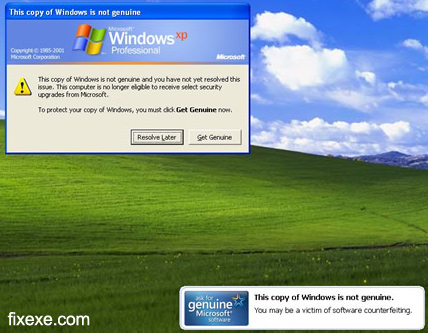
    Cara bagaimana nak selesaikan masalah "windows not genuine"

    Bosan dgn windows not genuine????sering hadapi masalah sprt di bwh?


    Nak software yg boleh mengenuinekan semula????
    Hah!!sila lah download sini dan  sini  dan sini !!!!!!!!!!!
    shhhhhhhhhhhhhhhhhhhhhhhhhhh..........

    Windows 8 Developer Preview (Pre-Beta) Build 8102 Released

    Windows 8 Developer Preview (Pre-Beta) Build 8102 Released = windows 8 percubaan.. sapa nak try sila download :


    1. Windows Developer Preview English, 64-bit (x64)
    Size: 3.6 GB
    SHA-1 Hash: 79DBF235FD49F5C1C8F8C04E24BDE6E1D04DA1E9
    Note: Includes a disk image file (.iso) to install the Windows Developer Preview and Metro style apps on a 64-bit PC.
    2. Windows Developer Preview English, 32-bit (x86)
    Size: 2.8 GB
    SHA-1 Hash: 4E0698BBABE01ED27582C9FC16AD21C4422913CC
    Note: Includes a disk image file (.iso) to install the Windows Developer Preview and Metro style apps on a 32-bit pc
    3. Windows Developer Preview with developer tools English, 64-bit (x64)
    Size: 4.8 GB
    SHA-1 Hash: 6FE9352FB59F6D0789AF35D1001BD4E4E81E42AF
    Note: All of the following come on a disk image file (.iso): 64-bit Windows Developer Preview, Windows SDK for Metro style apps, Microsoft Visual Studio 11 Express for Windows Developer Preview, Microsoft Expression Blend 5 Developer Preview and 28 Metro style apps including the BUILD Conference app
    Windows 8 has the similar system requirements with Windows 7:
    • 1 gigahertz (GHz) or faster 32-bit (x86) or 64-bit (x64) processor
    • 1 gigabyte (GB) RAM (32-bit) or 2 GB RAM (64-bit)
    • 16 GB available hard disk space (32-bit) or 20 GB (64-bit)
    • DirectX 9 graphics device with WDDM 1.0 or higher driver
    • Taking advantage of touch input requires a screen that supports multi-touch


    Followers

    Search This Blog

    Loading
    Ping your blog, website, or RSS feed for Free My Ping in TotalPing.com ping fast  my blog, website, or RSS feed for Free widgets,  tips, tutorials and SEO PageRank Checking IconFree Backlink Service, Links Building 4 Freepowered by Is Banned ??? [Valid Atom 1.0] Free SEO Tools widgets,  tips, tutorials and SEO Valid CSS! Malaysian Topsites AMAZON
    Subscribe via Email

    FACEBOOK FANPAGE